← Back to Projects
FSGrid POS: Local POS with Live Cloud Sync
FSGrid POS: Local POS with Live Cloud Sync preview

POS System + Cloud Dashboard

FSGrid POS: Local POS with Live Cloud Sync

A restaurant and café point-of-sale system that runs locally like a normal POS, but syncs every sale to the cloud in real time, so owners can check revenue, reports and menus and control the business from a PC, laptop, tablet or phone, wherever they are.

Stack

Local POS Terminal, Live Cloud Sync, Web Admin Panel

Outcome

Real-time sales visibility and control from any device

Project Overview

Most POS systems force a trade-off. A local, on-premise POS is fast and keeps working when the internet drops, but the owner only sees what happened by standing at the counter. A cloud-only POS gives remote access, but stops the till the moment the connection fails.

FSGrid POS removes that trade-off. The POS runs locally in the shop as a normal point-of-sale system, so billing, orders and shift closing stay fast and reliable. At the same time, every order, payment and report is always synced to a live cloud dashboard.

Owners and managers can sign in from a PC, laptop, tablet or mobile phone and see exactly what is happening (today's revenue, active orders, top items, payments and shift reports) and control the business remotely by managing the menu, inventory, staff, roles and settings.
Challenge

Café and restaurant owners needed a POS that keeps selling even without internet, but they also wanted to know how the business was doing without being on site. With a traditional local POS, sales figures, Z-reports and menu changes were locked to the counter machine, so checking the day's takings or changing a price meant being there in person.

Solution

FSGRID built FSGrid POS as a local-first system with continuous cloud sync. The in-store terminal handles orders, payments and shift closing, while a responsive web admin panel mirrors the data live. From any device, owners get a real-time dashboard, sales and Z-reports, menu and inventory management, tables, customers, staff, roles and permissions, corrections and backups.

Key Features

  • Runs locally as a normal POS, so billing and orders stay fast and keep working in the shop.
  • Always syncs to the cloud, so sales, orders and reports are live on the online dashboard.
  • Check and control the business from anywhere on a PC, laptop, tablet or mobile phone.
  • Live dashboard with today's revenue, active orders, average order value, voids, hourly revenue, payment methods, order types and top items.
  • Sales analytics plus X-reports for the current shift and a history of past Z-reports, with card and cash breakdowns.
  • Full back office: menu items and categories, inventory, tables, customers, staff, roles, permissions, corrections and backups.

Local POS · Cloud Admin Panel

Runs in the shop, managed from the cloud

The POS terminal works locally in the café or restaurant, just like a normal POS. Every sale is synced to the cloud admin panel, which gives owners and managers a complete, live view of the business and the tools to run it.

Live business dashboard

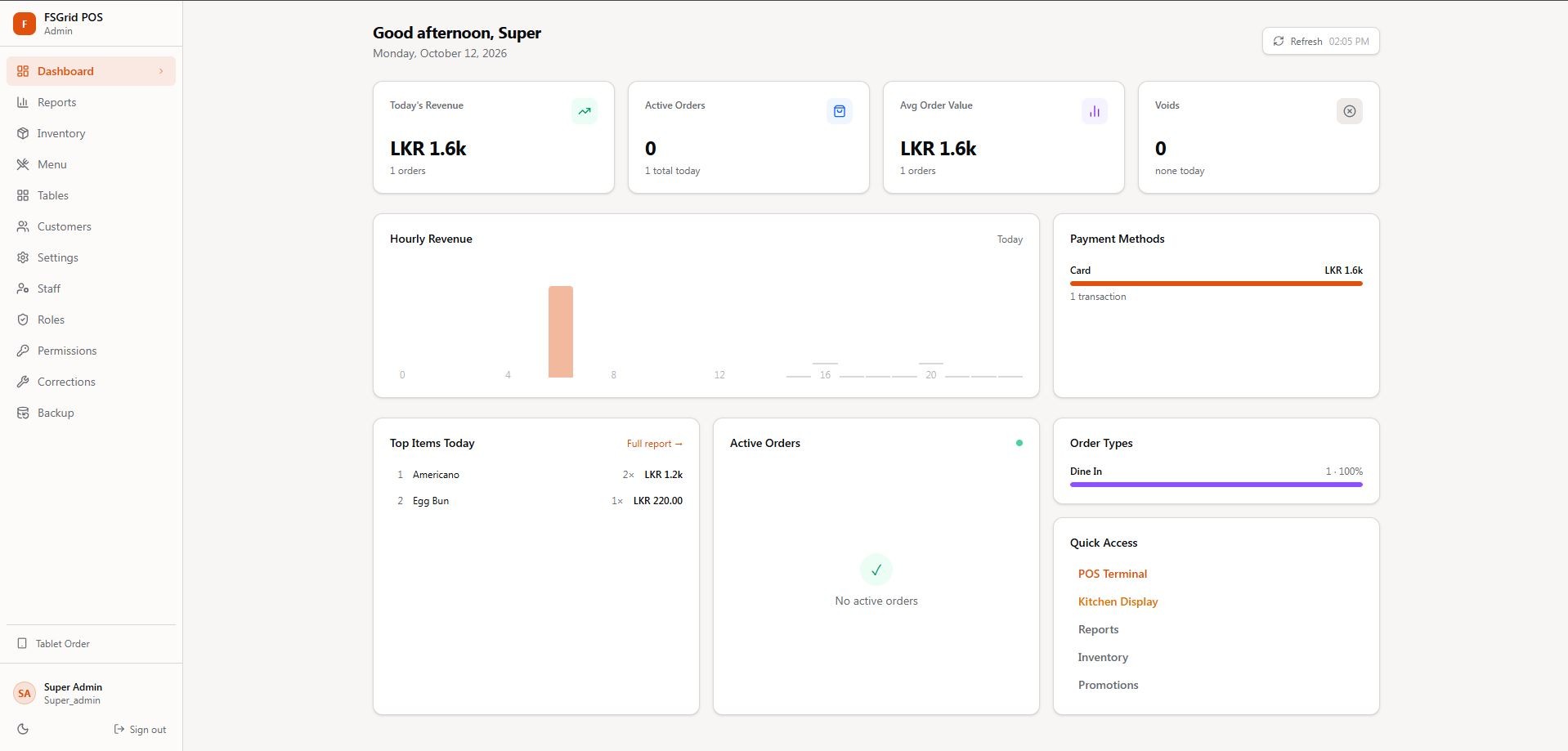
A greeting dashboard shows today's revenue, active orders, average order value and voids, with an hourly revenue chart, payment-method split, order types and today's top-selling items.

Quick access to every station

Shortcuts open the POS Terminal, Kitchen Display, Reports, Inventory and Promotions, and a Tablet Order mode supports taking orders at the table.

Shift and Z-reports

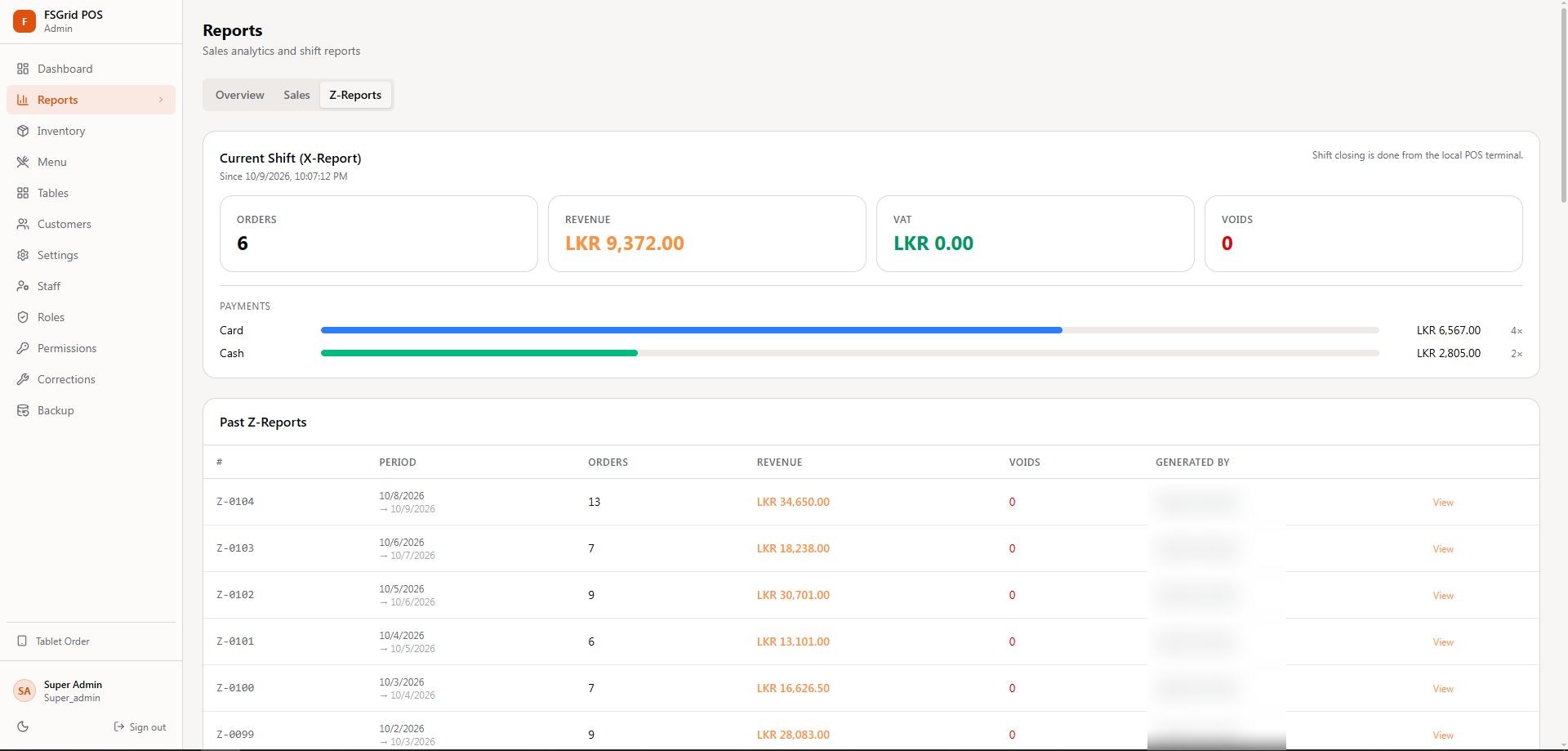
The current shift's X-report shows orders, revenue, VAT, voids and card versus cash payments. Shift closing is done on the local POS terminal, and every past Z-report is synced online with its period, orders, revenue and who generated it.

Menu management

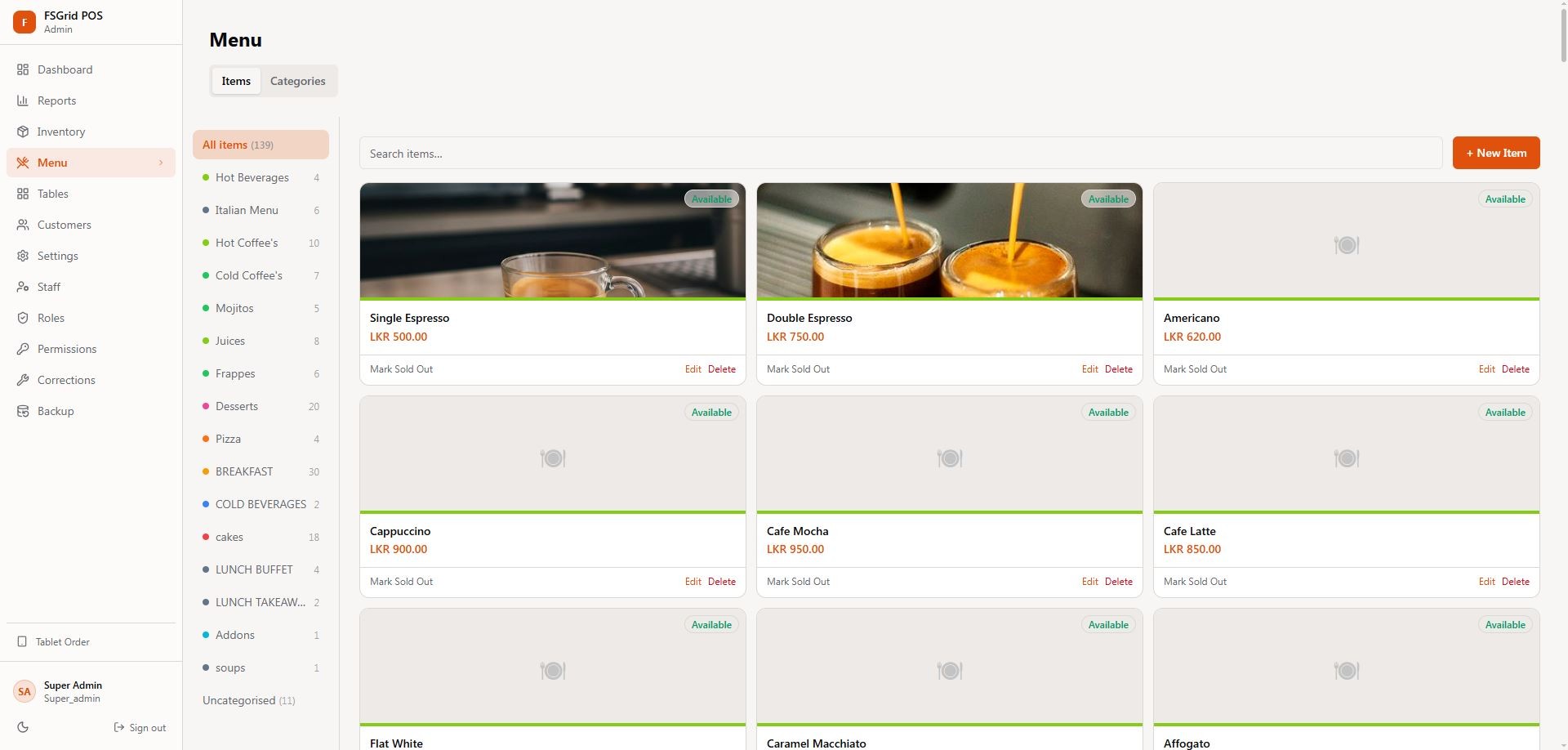
Manage menu items and categories with photos, prices and availability. Items can be searched, edited, marked as sold out or deleted, and changes reach the POS without visiting the shop.

Staff, roles and permissions

Create staff accounts and control exactly what each role can do, from cashier to super admin, keeping sensitive actions such as corrections and voids protected.

Inventory, customers and backups

Dedicated sections for inventory, tables, customers, settings, corrections and backups keep the whole operation managed in one place.

FSGrid POS: Local POS with Live Cloud Sync – Live dashboard with revenue, orders and top items
Live dashboard with revenue, orders and top items
FSGrid POS: Local POS with Live Cloud Sync – Current shift X-report and past Z-reports
Current shift X-report and past Z-reports
FSGrid POS: Local POS with Live Cloud Sync – Menu items and categories
Menu items and categories

Anywhere Access · Any Device

Check your business from your phone

Because the POS is always synced, the same admin panel works on a phone or tablet. Owners can open it from anywhere to see how the day is going and keep control of the business, even when they are away from the shop.

Today's numbers in your pocket

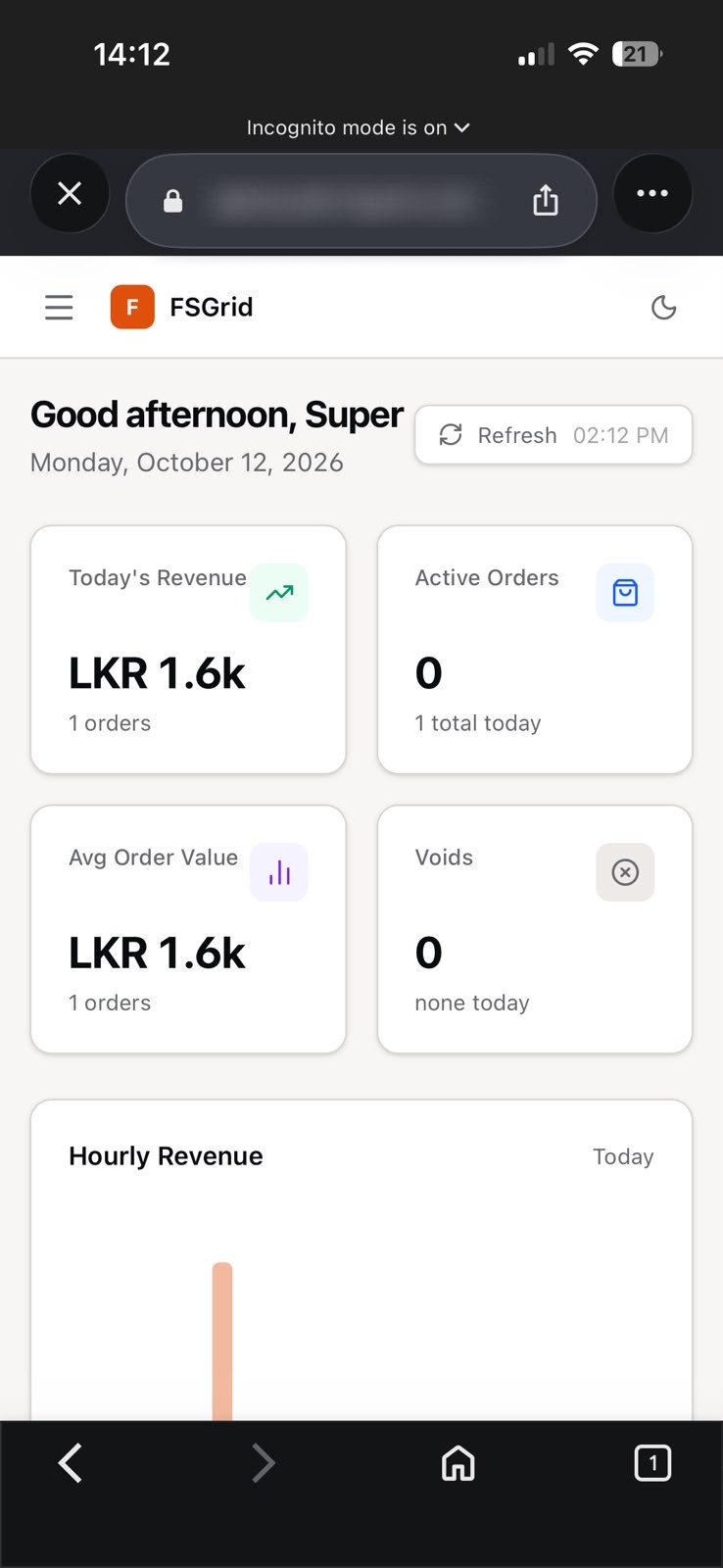
The mobile dashboard shows today's revenue, active orders, average order value, voids and hourly revenue, refreshed with one tap.

Reports for any period

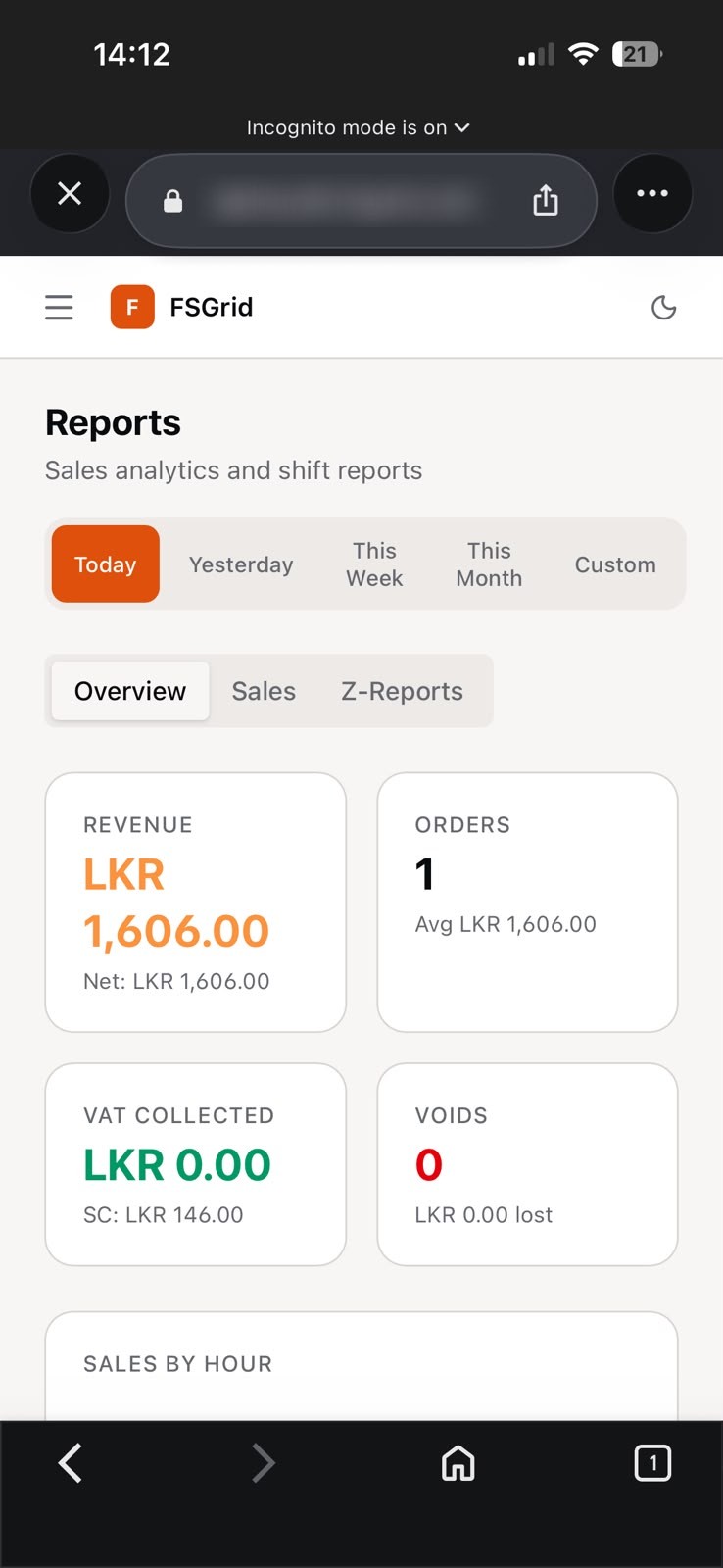
Switch between Today, Yesterday, This Week, This Month or a custom range to see revenue, net sales, orders, VAT, service charge and voids.

Full control on the go

The complete admin menu is available on mobile, so menus, inventory, staff and settings can be updated from wherever you are.

Works on every screen

The panel adapts to PC, laptop, tablet and phone, with a dark mode for comfortable use at any time of day.

FSGrid POS: Local POS with Live Cloud Sync – Live dashboard on mobile
Live dashboard on mobile
FSGrid POS: Local POS with Live Cloud Sync – Sales reports by period on mobile
Sales reports by period on mobile